Hi everyone, I hope you're doing well. I've been reading Bug Bounty Bootcamp by Vickie Li — a solid resource on recon methodology and vulnerability reporting for bug hunters. Inspired by the subdomain enumeration techniques covered there, I put together a crt.sh script that pulls subdomains from Certificate Transparency logs. This article walks through the bash fundamentals you need to understand it, then breaks down the script piece by piece.
What is a bash script?
Bash is a Unix shell and command-line interpreter — a program that reads user input and executes it. For example, ls lists files in the current directory, and ls -l extends that behavior with an option passed alongside the command. This is what makes bash a high-level abstraction: unlike C or C++, which sit close to the hardware and give direct access to memory management and CPU instructions, bash operates at a layer above all of that.
What draws people to bash scripting is its simplicity. Being a high-level abstraction means you can deploy a script to perform a specific automated task without worrying about the underlying hardware architecture. You describe what you want to happen — the system figures out how.
Historically
What is the history of bash?
Bash stands for Bourne Again Shell. "Bourne Again" is a reference to Stephen Bourne, who created the original Bourne shell (sh) — the first widely used Unix shell, written in 1977. There's some debate about exact dates and release history, but honestly, that's not the important part.
What do I need to know before I start?
I won't cover all of programming fundamentals here — objects, data structures, and the rest. I'll only scratch the surface of the basics, because I don't want this article to become unnecessarily complex for beginners or repetitive for people who already know this. I'll include references throughout as I go.
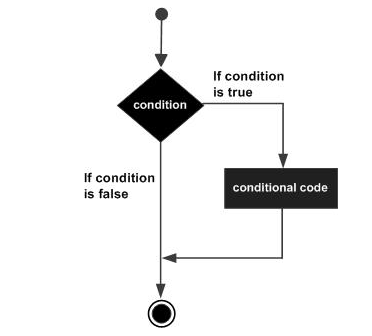
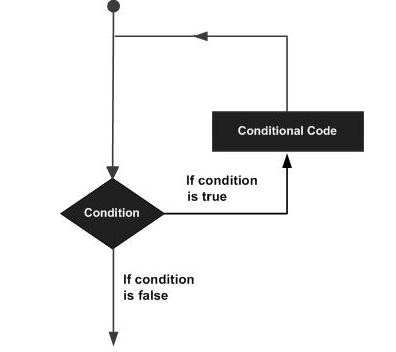
Let's start with control structures, which appear in almost every programming language. They let you execute a block of code repeatedly or conditionally. The key difference between them lies in approach and use case:
- While loop: The condition is evaluated before each iteration. Used when the number of iterations is unknown in advance. Link
- For loop: Used when the number of iterations is known. The condition is evaluated at the start of each cycle. Link
- Do-while loop: The code block executes at least once before the condition is checked. Bash doesn't have a native do-while, but you can replicate it with
while true; do ... break; done. Link - If statement: Validates a condition before executing a block. If true, the block runs; otherwise, it's skipped. Link
- Case statement: Bash's equivalent of switch — matches a variable against multiple patterns and runs the corresponding block. Cleaner than a long if-elif chain when checking one variable against many values. Link
- Functions: Instead of writing the same code block multiple times, you define a function once and call it whenever needed. It's not the same as a loop — it's about saving a reusable block of code to improve readability and reduce duplication. Link
Let's get started
First, we'll create a bash script file that does something simple: print a greeting. Use this command to create and open the file. I'll use nano script.sh.
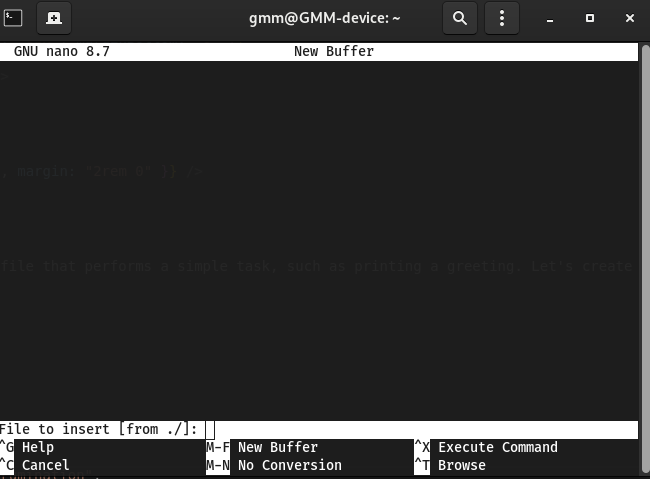
After creating the file, add the shebang line at the top. This special line tells the system which interpreter to use. In our case: #!/bin/bash. Without it, the system won't know to treat this file as a bash script.
#!/bin/bash
echo "Hello, World!"
Save and exit — in nano, press Ctrl + X then Y. Now add execute permission to the file:
chmod +x script.sh
Now run it:
./script.sh
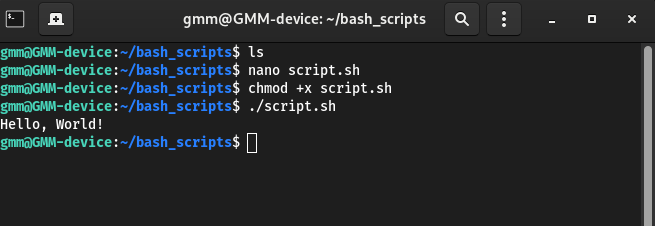
The script ran and printed "Hello, World!" — echo is bash's equivalent of print in other languages. Now let's make it interactive.
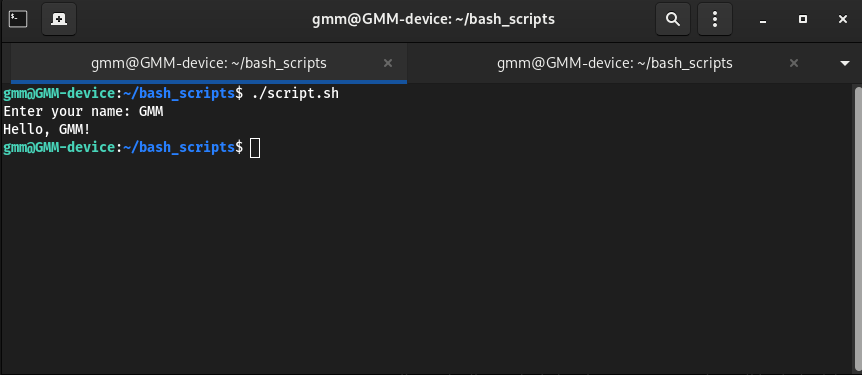
We can use the read command to accept input from the user and greet them personally:
#!/bin/bash
read -p "Enter your name: " name
echo "Hello, $name!"
read -p "Enter your name: " name prompts the user and stores their input in the name variable. The -p flag lets you write a custom prompt message. The $ symbol tells bash to treat what follows as a variable name.
What is crt.sh and why does it matter?
Certificate Transparency (CT) is a public logging framework that certificate authorities use to record every TLS certificate they issue. crt.sh is a search engine over those logs — and because certificates list the domains they cover, it regularly exposes subdomains that never appear in DNS records or search engines.
For a bug bounty hunter, this means you can discover forgotten staging environments, internal-looking subdomains, and assets the target may not even realize are public-facing — without scanning a single port. You're reading a public record that the CA published. The script below automates that lookup, filters the output down to only the subdomains that actually belong to your target, and writes them to a deduplicated file.
A practical example
Bash layer — argument handling, temp files, and data fetching
#!/usr/bin/env bash
set -euo pipefail

# Usage: ./crtsh.sh example.com [output_file]
domain="${1:-}"
out="${2:-}"

if [[ -z "$domain" ]]; then
  echo "Usage: $0 <domain> [output_file]" >&2
  exit 1
fi

# Default output filename if not provided
if [[ -z "$out" ]]; then
  # replace * and / to keep filename safe
  safe_domain="${domain//*/}"
  safe_domain="${safe_domain////_}"
  out="crtsh_${safe_domain}_$(date +%Y%m%d_%H%M%S).txt"
  fi

  # Prefer JSON endpoint (cleaner parsing)
  # It returns entries with fields like: name_value, common_name, ...
  # We extract all names, split multiline name_value, normalize, dedupe, and keep only relevant ones.
  tmp_json="$(mktemp)"
  trap 'rm -f "$tmp_json"' EXIT

  curl -fsSL     -H 'User-Agent: Mozilla/5.0'     "https://crt.sh/?q=${domain}&output=json"     -o "$tmp_json" || {
      echo "Failed to fetch JSON from crt.sh. Check connectivity or try again." >&2
      exit 2
    }

  # Parse JSON with python (avoids jq dependency)
  python3 - "$domain" "$out" < "$tmp_json" <<'PY'
  import sys, json, re

  domain = sys.argv[1].strip().lower()
  out = sys.argv[2]

  data = json.load(sys.stdin)

  names = set()
  for row in data:
      nv = row.get("name_value") or ""
      cn = row.get("common_name") or ""
      # name_value can include multiple lines
      for s in (nv.splitlines() + [cn]):
          s = s.strip().lower()
          if not s:
              continue
          # Remove leading "*." for normalization but keep wildcard in matching logic below
          names.add(s)
The first real line after the shebang is set -euo pipefail. This is a safety header that every serious bash script should include:
-e— exit immediately if any command returns a non-zero exit code-u— treat any unset variable as an error instead of silently expanding to an empty string-o pipefail— if any command in a pipeline fails, the whole pipeline fails (without this, only the last command's exit code is checked)
domain="${1:-}"
out="${2:-}"
These two lines initialize the domain and out variables. The syntax ${1:-} is called parameter expansion — it assigns the first command-line argument if one is provided, and falls back to an empty string if not. Same logic applies to out with the second argument.
if [[ -z "$domain" ]]; then
The -z flag checks whether a string is empty (zero-length). If domain is empty, the script prints an error message and exits with status code 1. The >&2 at the end redirects the message to stderr (standard error) instead of stdout — this way the error displays in the terminal rather than getting written to an output file.
 if [[ -z "$out" ]]; then
  # replace * and / to keep filename safe
  safe_domain="${domain//*/}"
  safe_domain="${safe_domain////_}"
  out="crtsh_${safe_domain}_$(date +%Y%m%d_%H%M%S).txt"
  fi
If the user didn't provide an output filename, this block generates a default one based on the domain and current timestamp. The substitutions strip * and / characters from the domain name to keep the filename safe for the filesystem.
  tmp_json="$(mktemp)"
  trap 'rm -f "$tmp_json"' EXIT
mktemp creates a temporary file — useful for storing the JSON we fetch from crt.sh before we parse it. The trap command registers a cleanup handler: when the script exits for any reason, it automatically deletes the temp file. The -f flag with rm forces deletion even if the file doesn't exist, preventing false errors.
 curl -fsSL -H 'User-Agent: Mozilla/5.0' "https://crt.sh/?q=${domain}&output=json" -o "$tmp_json" || {
    echo "Failed to fetch JSON from crt.sh. Check connectivity or try again." >&2
    exit 2
  }
Breaking down the curl flags: -f makes curl fail silently on HTTP errors instead of returning the error page as content. -s hides the progress bar. -S shows the error message if something goes wrong (even with -s active). -L follows redirects. The -H flag adds a custom User-Agent header — crt.sh may block plain curl requests, so we disguise ourselves as a browser.
Before we get into the Python, there's one more bash concept worth understanding: the heredoc. The line that starts the Python block looks like this:
python3 - "$domain" "$out" < "$tmp_json" <<'PY'
  ... python code ...
PY
Breaking it down: <<'PY' is a heredoc delimiter — it tells bash to feed everything between PY and the closing PY as standard input to the command on the left. The single quotes around PY are important: they prevent bash from expanding $variables inside the block, so Python receives the literal source code unchanged.
The < "$tmp_json" part redirects the JSON file into the process as stdin. But wait — if stdin is already taken by the heredoc, how does json.load(sys.stdin) read the file? The answer is that python3 - reads its script from the heredoc (which gets piped as stdin to the interpreter), while the < $tmp_json redirect replaces the process's stdin before the heredoc is applied — so inside the Python script, sys.stdin is the JSON file. It's a standard shell trick for embedding a script and passing data to it in one command.
  names = set()
  for row in data:
      nv = row.get("name_value") or ""
      cn = row.get("common_name") or ""
      # name_value can include multiple lines
      for s in (nv.splitlines() + [cn]):
          s = s.strip().lower()
          if not s:
              continue
          # Remove leading "*." for normalization but keep wildcard in matching logic below
          names.add(s)
for row in data: iterates over each dictionary in the JSON response. nv = row.get("name_value") or "" retrieves the name_value field, falling back to an empty string if it's missing. cn = row.get("common_name") or "" does the same for common_name — think of this as the primary domain on the certificate, like google.com.
The inner loop for s in (nv.splitlines() + [cn]): splits nv into individual lines (since a single certificate can list multiple domains), then appends cn to the list. The result is a flat list of every domain name associated with that certificate entry.
For illustration — suppose a row contains these values:
"name_value": "example.com
www.example.com"
"common_name": "example.com"
The code splits nv into ["example.com", "www.example.com"], then adds cn as a third element: ["example.com", "www.example.com", "example.com"]. All three get added to the names set, which automatically deduplicates them.
Python layer — domain relevance filtering
  def relevant(name: str, dom: str) -> bool:
      # keep wildcard and non-wildcard forms that relate to the domain
      # e.g. *.example.com, a.example.com, example.com
      if name == dom:
          return True
      if name.endswith("." + dom):
          return True
      if name.startswith("*.") and (name[2:] == dom or name[2:].endswith("." + dom)):
          return True
      return False

  # Filter only domain-related entries, normalize, dedupe
  filtered = []
  for n in names:
      # drop obvious garbage
      if " " in n or "/" in n:
          continue
      # keep
      if relevant(n, domain.lstrip(".")):
          filtered.append(n)

  filtered = sorted(set(filtered))
  with open(out, "w", encoding="utf-8") as f:
      for n in filtered:
          f.write(n + "
")

  print(f"Wrote {len(filtered)} unique names to: {out}")
  PY

  # Optional: also keep the raw JSON for auditing
  # cp "$tmp_json" "${out}.json"
The function takes two parameters: name (the domain or wildcard pattern to test) and dom (the base domain to match against).
First condition — if name == dom: if the name exactly matches the target domain, return True immediately.
Second condition — if name.endswith("." + dom): if the name ends with a dot followed by the domain (e.g. www.example.com ends with .example.com), it's a subdomain — return True.
Third condition — wildcard handling:
if name.startswith("*.") and (name[2:] == dom or name[2:].endswith("." + dom)):
    return True
If the name starts with *., it's a wildcard. The function then checks whether the part after the wildcard (name[2:]) exactly matches the domain or is a subdomain of it. Two sub-checks because wildcards can appear at any subdomain depth.
Some concrete examples to make this tangible:
name = example.com, dom = example.com: First condition matches — returns True.
name = www.example.com, dom = example.com: Second condition matches — returns True.
name = *.example.com, dom = example.com: Third condition — starts with *. and name[2:] equals example.com — returns True.
name = b.example.net, dom = example.com: None of the conditions match — returns False.
Python layer — deduplication and output
  filtered = []
  for n in names:
      # drop obvious garbage
      if " " in n or "/" in n:
          continue
      # keep
      if relevant(n, domain.lstrip(".")):
          filtered.append(n)
          ....
I'll keep this section brief and focus on the key concept.
What is domain matching?
Domain matching is the process of checking whether a given domain name or wildcard pattern relates to a specific base domain. This is essential for filtering certificate transparency data — crt.sh returns certificates from across the entire internet, so we need to keep only the ones that actually belong to the domain we're investigating. The relevant function is at the heart of this. It takes a name (the entry from crt.sh) and a dom (our target), and returns True if they match under any of three rules:
1. Exact match: the name is identical to the domain.
2. Suffix match: the name ends with .domain — it's a subdomain.
3. Wildcard match: the name starts with *. and the remaining part matches the domain.
Complete script
Here's the full script in one place, ready to use:
#!/usr/bin/env bash
set -euo pipefail

# Usage: ./crtsh.sh example.com [output_file]
domain="${1:-}"
out="${2:-}"

if [[ -z "$domain" ]]; then
  echo "Usage: $0 <domain> [output_file]" >&2
  exit 1
fi

if [[ -z "$out" ]]; then
  safe_domain="${domain//\*/}"
  safe_domain="${safe_domain//\//_ }"
  out="crtsh_${safe_domain}_$(date +%Y%m%d_%H%M%S).txt"
fi

tmp_json="$(mktemp)"
trap 'rm -f "$tmp_json"' EXIT

curl -fsSL \
  -H 'User-Agent: Mozilla/5.0' \
  "https://crt.sh/?q=${domain}&output=json" \
  -o "$tmp_json" || {
    echo "Failed to fetch JSON from crt.sh. Check connectivity or try again." >&2
    exit 2
  }

python3 - "$domain" "$out" < "$tmp_json" <<'PY'
import sys, json

domain = sys.argv[1].strip().lower()
out    = sys.argv[2]
data   = json.load(sys.stdin)

names = set()
for row in data:
    nv = row.get("name_value") or ""
    cn = row.get("common_name") or ""
    for s in (nv.splitlines() + [cn]):
        s = s.strip().lower()
        if s:
            names.add(s)

def relevant(name, dom):
    if name == dom:
        return True
    if name.endswith("." + dom):
        return True
    if name.startswith("*.") and (name[2:] == dom or name[2:].endswith("." + dom)):
        return True
    return False

filtered = sorted({
    n for n in names
    if " " not in n and "/" not in n
    and relevant(n, domain.lstrip("."))
})

with open(out, "w", encoding="utf-8") as f:
    f.write("\n".join(filtered) + "\n")

print(f"Wrote {len(filtered)} unique names to: {out}")
PY
Save it as crtsh.sh, make it executable with chmod +x crtsh.sh, and run:
./crtsh.sh example.com
I realize I went fairly deep into some of the implementation details here, but I think this is a solid example for reinforcing the programming fundamentals that matter most in bash scripting. I hope you found it useful, and I'm sorry if it ran a bit long. Stay tuned for the next one ^^
Author: GMM
buy me a coffee: ko-fi.com/ghostman77506